
Creating TPM Extensions for SAP Trading Partner Management V2 Pipeline

In today’s hyperconnected business landscape, B2B communication isn’t just an advantage—it’s a necessity. SAP’s Cloud Integration – Trading Partner Management V2 pipeline brings a modern, scalable, and governance driven approach to managing electronic data and partner interactions across your enterprise.
B2B Scenarios in SAP Integration Suite centralizes the configuration of trading partners, agreements, identifiers, and communication channels, enabling organizations to orchestrate complex B2B communications with clarity and control.
While B2B Scenarios currently allows you to set-up AS2, SOAP_1.x, IDOC, Process_Direct, SAP RM, and SFTP connections directly in the partner profiles, you can also have business partners that require other communication adapters. These can be connected quite easily to your B2B Scenario Agreements via ProcessDirect.
Sender information (step 1 in the pipeline model)
Currently, B2B Scenarios only supports the direct set-up of the following sender adapters for use in the TPM Agreements:

Let’s say my business partner wants to send data over the Cloud Integration – Trading Partner Management V2 pipeline via HTTPS. In the partner profile of my sender in B2B Scenarios, I will create a sender Process_Direct adapter:

I will then create a package for my TPM Sender Extensions and create an integration flow with a HTTPS sender adapter and ProcessDirect receiver adapter. The ProcessDirect receiver will contain the address of the Step 1 - Sender Process Direct Communication Flow V2 in the pipeline – note that I also create a Content Modifier, where I store the Adapter Type and Document Standard. This is needed for the pipeline.

Receiver information (step 3a in the pipeline model)
Currently, B2B Scenarios only supports the direct set-up of the following receiver adapters for use in the TPM Agreements:

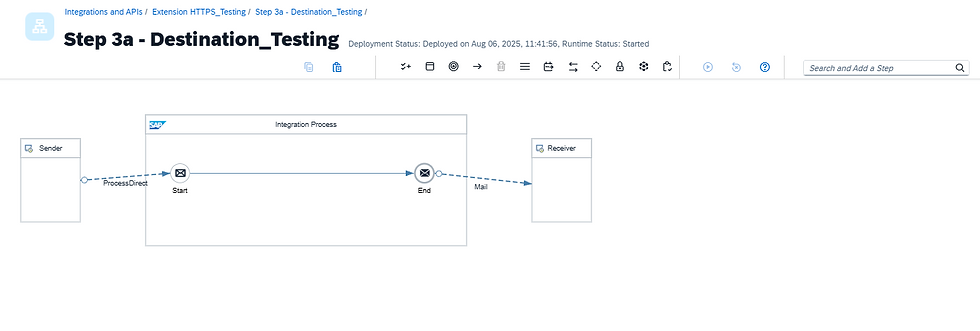
Now, let’s say my business partner wants to receive data via the Mail adapter. In the partner profile of my receiver in B2B Scenarios, I will create a Process_Direct receiver adapter. In the set-up, I will include the ProcessDirect address of the ProcessDirect sender in my Step 3a receiver integration flow that will go to my Mail adapter:

I will then create a package for my TPM Receiver Extensions and create an integration flow with a ProcessDirect sender and my Mail receiver adapter. If I wanted to do any transformations prior to the sending of the messages to the Mail adapter, I could also do that here:
Conclusion
In my examples, I use HTTPS sender and Mail receiver adapters, but any SAP Cloud Integration-supported adapter can be used here. The key takeaway here is the ability to connect to these adapters easily in your B2B Scenario Agreements via ProcessDirect. This proves how B2B Scenario and the Cloud Integration – Trading Partner Management V2 pipeline in SAP Integration Suite really helps to streamline your B2B business processes.
Cover designed by Freepik


